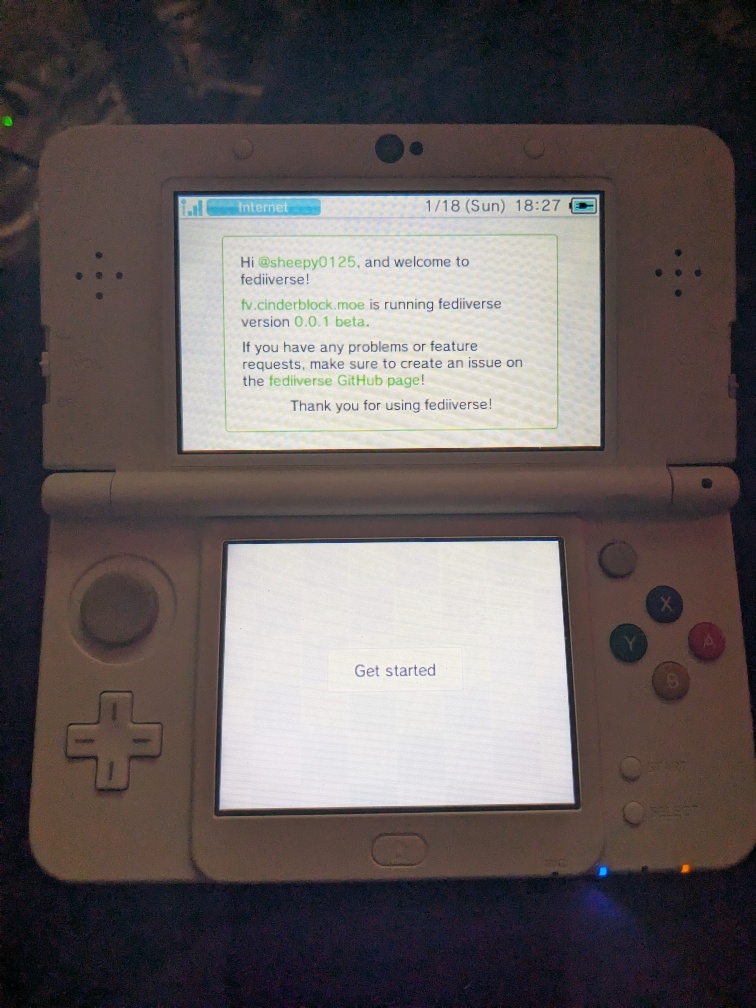
Setting up fediiverse
A friend of mine, 760ceb3b9c0ba4872cadf3ce35a7a494, made a really cool service called "fediiverse" to use a Fediverse instance in the 3DS's Miiverse applet. This is just a short blog post to explain what I had to do to get it running on my Debian Bookworm (13) server and running on my 3DS.
Hosting a fediiverse instance
(For this, I'm using a directory I use for all my hosting shenanigans, /server/).
The documentation says that fediiverse needs:
- A version of OpenSSL that supports TLSv1 and TLSv1.1. You may have to compile openssl manually for this, making sure the
enable-tls1andenable-tls1_1flags are set. - nginx, pointing to a version of OpenSSL that supports TLSv1 and TLSv1.1. If nginx is not pointing to the right OpenSSL version, you may have to recompile nginx with your new OpenSSL. You can check with
nginx -V
Because Fediiverse needs the now-extremely-insecure TLSv1/TLSv1.1, it wants us to run its nginx configuration in front of the rest of our nginx configuration for other services. It uses the "SSL preread" module to map any TLSv1/TLSv1.1 connections on :443 to itself and to proxy any TLSv1.2 or higher connections to an upstream server, a.k.a. another nginx instance running on another port (e.g. :8443). This is annoying, sure, but it's the best that can be managed within the limitations of nginx without having other services use said insecure TLS (or that's what 760c...a494 tells me, she knows way more about this than I do!).
Fediiverse setup
cd /server/
git clone https://github.com/760ceb3b9c0ba4872cadf3ce35a7a494/fediiverse && cd fediiverse/
We need to set up a Python virtual environment to install all the packages. I'll be using python3-venv andpip for them.
python3 -m venv venv
source venv/bin/activate
pip install -r requirements.txt
pip install python-multipart
Running the first time setup, now:
# in the venv
python3 ./first-time-setup.py
A few considerations:
- The path for the fediiverse instance must match the prefix we set earlier.
- The domain name can only be ≤34 characters in length
- We set the remote proxy to port
8443by default, so we will need to change the rest of our non-fediiverse nginx paths from:443to:8443. We'll come back to this.
Welcome to the fediiverse first-time setup!
? Select a path for this fediiverse instance: /home/sheepy/.fediiverse
? Where would you like fediiverse nginx to store logs? (Make sure this directory exists!) /var/log/nginx/fediiverse
? At what domain name will your fediiverse instance be located? fv.cinderblock.moe
OK, the following domain names will be used:
- fv.cinderblock.moe
- d.fv.cinderblock.moe
- olv.fv.cinderblock.moe
- img.fv.cinderblock.moe
- setup.fv.cinderblock.moe
? Is that OK? Yes
? Would you like to specify an upstream HTTPS server to proxy? Yes
? What socket address would you like to make upstream? 127.0.0.1:8443
your fediiverse server has been set up in ~/.fediiverse!
for further instruction, see ./docs/hosting/setup-instructions.md and configuration.md.
As mentioned, we need to make sure our log directory exists:
sudo mkdir -p /var/log/nginx/fediiverse/
And we'll also want to make our root path:
mkdir ~/.fediiverse/
To build our nginx configuration:
# in the venv
python3 ./build-nginx-configuration.py
Updating nginx configuration based on config.json...
Traceback (most recent call last):
  File "/server/fediiverse/./build-nginx-configuration.py", line 11, in <module>
    main()
    ~~~~^^
  File "/server/fediiverse/./build-nginx-configuration.py", line 6, in main
    build_configuration(log=True)
    ~~~~~~~~~~~~~~~~~~~^^^^^^^^^^
  File "/server/fediiverse/fediiverse/nginx/__init__.py", line 22, in build_configuration
    from fediiverse.storage import get_config, NGINX_PATH
  File "/server/fediiverse/fediiverse/storage.py", line 21, in <module>
    raise ValueError("FEDIIVERSE_ROOT_PATH not specified")
ValueError: FEDIIVERSE_ROOT_PATH not specified
...ah. We need to set that as an environment variable.
export FEDIIVERSE_ROOT_PATH=$(realpath ~/.fediiverse/)
python3 ./build-nginx-configuration.py
Updating nginx configuration based on config.json...
 -> ssl-discovery.conf...               done!
 -> fediiverse.conf...                  done!
 -> ssl-base.conf...                    done!
 -> nginx.conf...                       done!
 -> mime.types...                       done!
 -> ssl-olv.conf...                     done!
 -> discovery.xml...                    done!
done!
Building nginx for fediiverse
I'm compiling an nginx binary to use just with fediiverse. This is to configure it to have a different prefix as to not mess with the system-wide nginx that I'm running concurrently.
sudo apt install -y gcc make perl libperl-dev libgd-dev libxml2-dev libxslt1-dev libpcre2-dev
cd /server/
wget http://nginx.org/download/nginx-1.28.1.tar.gz
tar -xzf nginx-1.28.1.tar.gz && rm nginx-1.28.1.tar.gz
cd nginx-1.28.1/
Now for a hell of a configure line. There are a few important parts.
--prefixpoints to the fediiverse root instance path. We previously set this at$FEDIIVERSE_ROOT_PATH.--pid-pathand--lock-pathpoint to a different path than the defaults, to not conflict with another nginx instance using them; the same goes for a few other options. N.B. there are some more options for more paths (e.g.--prefix,--modules-path,--fastcgi-temp-path), but we either don't use them within fediiverse or we override them ourselves, so there's no worry for conflicting with another running nginx instance.- I took the rest of the options from a system-wide
nginx -Vand pruned a few — there are way more we don't need but 1) there's no harm in keeping them and 2) I didn't want to break something.
./configure \
	--prefix=$(realpath ~/.fediiverse/nginx) \
	--pid-path=/run/fv-nginx.pid --lock-path=/var/lock/fv-nginx.lock \
	--http-client-body-temp-path=/var/lib/fv-nginx/body --http-proxy-temp-path=/var/lib/fv-nginx/proxy \
	--http-log-path=/dev/null --error-log-path=stderr \
	--with-stream --with-stream_ssl_module --with-stream_ssl_preread_module --with-stream_realip_module \
	--with-compat --with-debug --with-pcre-jit --with-http_ssl_module --with-http_stub_status_module --with-http_realip_module --with-http_auth_request_module --with-http_v2_module --with-http_slice_module --with-threads --with-http_addition_module --with-http_gunzip_module --with-http_gzip_static_module --with-http_mp4_module --with-http_random_index_module --with-http_secure_link_module --with-http_sub_module --with-http_image_filter_module --with-http_xslt_module \
	--with-cc-opt='-g -O2 -fstack-protector-strong -Wformat -Werror=format-security -fPIC -Wdate-time -D_FORTIFY_SOURCE=2' \
	--with-ld-opt='-Wl,-z,relro -Wl,-z,now -fPIC'

# we referenced some temporary paths at this directory:
sudo mkdir -p /var/lib/fv-nginx/
To build nginx:
make -j$(nproc)
will leave ./objs/nginx as our final binary. We'll just hold on to this and won't install it.
Nginx setup
As mentioned, fediiverse's nginx needs to run in front of the rest of our nginx configuration. The rest of our configuration also needs to move from port :443 to :8443 (or, whatever you set as the proxy in the setup wizard). I didn't feel like using sed and potentially messing something up, so I just went ahead and did
sudo vim /etc/nginx/sites-enabled/*
replacing 443 with 8443, and doing :w, :next a few times. Reload the configuration and see if any errors or warnings pop up:
sudo nginx -s reload
The docs also say that we can expose the welcome page if we want. This is how I did it:
server {
	server_name fv.cinderblock.moe;
	listen 8443 ssl;
	http2 on;

	ssl_certificate /etc/letsencrypt/live/cinderblock.moe/fullchain.pem;
	ssl_certificate_key /etc/letsencrypt/live/cinderblock.moe/privkey.pem;

	location / {
		proxy_pass http://localhost:19827/;
	}
}
There's also little hack I need to do for right now (because fediiverse-bridge doesn't link to curl to support https:// ;-;). I have a service running on :80 (for ACME) that fediiverse tries to bind to for the setup.fv sub-domain. The simplest solution is to just change the port it runs on to something else (~/.fediiverse/nginx/fediiverse.conf):
diff --git a/nginx/fediiverse.conf b/nginx/fediiverse.conf
index 4d8715e..705bbc8 100644
--- a/nginx/fediiverse.conf
+++ b/nginx/fediiverse.conf
@@ -46,7 +46,7 @@ server {

 # setup - Setup Utility over plain http
 server {
-       listen 80;
+       listen 19826;
        server_name setup.fv.cinderblock.moe;

        access_log /var/log/nginx/fediiverse/setup.access.log combined;
and edit the configuration file accordingly (~/.fediiverse/config.json)
-"setup_host": "setup.fv.cinderblock.moe"
+"setup_host": "setup.fv.cinderblock.moe:19826"
(hopefully a newer update of fediiverse and fediiverse-bridge won't need this, hehe!)
Running
I created a small shell script to run all the Python web services:
/server/fediiverse/run.sh
#!/bin/sh

. venv/bin/activate

uvicorn fediiverse.servers.welcome:app --port 19827 &
uvicorn fediiverse.servers.olv:app --port 19829 &
uvicorn fediiverse.servers.img:app --port 19830
I created a few systemd service files to make this persistent:
/etc/systemd/system/fediiverse-nginx.service
[Unit]
Description=fediiverse nginx
After=network.target

[Service]
Restart=always
PIDFile=/run/fv-nginx.pid
Environment="FEDIIVERSE_ROOT_PATH=/home/sheepy/.fediiverse/"
ExecStart=/server/nginx-1.28.1/objs/nginx -g 'daemon on; master_process on; user root;' -c ${FEDIIVERSE_ROOT_PATH}/nginx/nginx.conf
ExecStop=-/sbin/start-stop-daemon --quiet --stop --retry QUIT/5 --pidfile /run/fv-nginx.pid

[Install]
WantedBy=default.target
/etc/systemd/system/fediiverse
[Unit]
Description=fediiverse
After=network.target

[Service]
Restart=always
WorkingDirectory=/server/fediiverse/
Environment="FEDIIVERSE_ROOT_PATH=/home/sheepy/.fediiverse/"
ExecStart=/server/fediiverse/run.sh

[Install]
WantedBy=default.target
sudo systemctl daemon-reload
sudo systemctl enable --now fediiverse-nginx
sudo systemctl enable --now fediiverse
To otherwise run fediiverse's nginx, just make sure that the default user for nginx (i.e. nginx or www-data) can access your fediiverse root path. Or, just run nginx with -g 'user root;'.
Using fediiverse
(This part of the blog is super short. That's because it's easy!)
I went to my fediiverse welcome page and entered my instance, wetdry.world. It sent me to a Mastodon OAuth2 page and then redirected me to a page with installation steps. I just followed the steps to install the Fediiverse Setup Utility and to scan the QR code, rebooted, and got placed at a welcome screen.